Cookie banners and consent: what the rules require
In the EU and the UK, you need clear, opt-in consent before setting any cookie or similar tracker that isn’t strictly necessary for the service the user asked for. That catches analytics, advertising and most social media pixels. The US has no general cookie consent law, but state privacy laws require you to let people opt out of tracking for targeted advertising, and several require you to honor browser privacy signals. A compliant European banner offers “Reject all” as easily as “Accept all,” and nothing non-essential loads until the visitor chooses.
It isn’t really about cookies
The European rule comes from the ePrivacy Directive (in the UK, the Privacy and Electronic Communications Regulations, usually called PECR). It covers storing or reading any information on a user’s device. Cookies are the famous example, but the same rule applies to pixels, local storage, SDKs in mobile apps and device fingerprinting.
Take a ceramics shop in Lisbon selling online. Its site runs an analytics tool, a Meta pixel, a chat widget and an embedded video player. It doesn’t matter that none of these are labelled cookies in the site settings. Each one reads or stores something on the visitor’s device, so each one needs checking.
Which trackers need consent
The European exemption is narrow. You don’t need consent for something strictly necessary to provide a service the user explicitly asked for, or used only to carry a communication over a network.
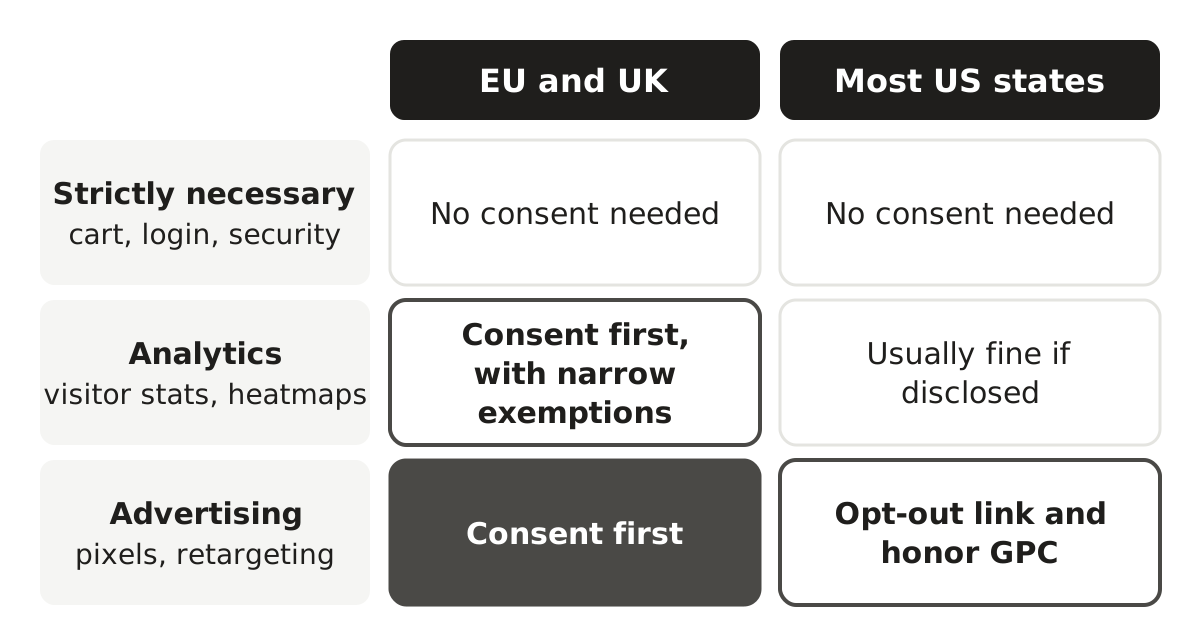
- Usually exempt: shopping cart and checkout cookies, login sessions, load balancing, security and fraud prevention, and the cookie that remembers the visitor’s consent choice.
- Usually need consent in the EU: analytics, advertising, retargeting pixels, social media plugins that track, A/B testing tools, and most embedded third-party content.
Analytics is where things are loosening a little. France’s regulator allows a narrow exemption for tightly configured audience measurement. The UK’s Data (Use and Access) Act 2025 goes further, allowing some low-risk cookies, including certain analytics, without consent as its provisions come into force, provided users are told and can object. Check the current position before relying on either.
What valid consent looks like in the EU and UK
Consent has to meet the GDPR standard: freely given, specific, informed and unambiguous. For a cookie banner, that turns into some very practical rules.
- Nothing non-essential fires before the choice. The analytics script and ad pixels stay blocked until the visitor clicks accept.
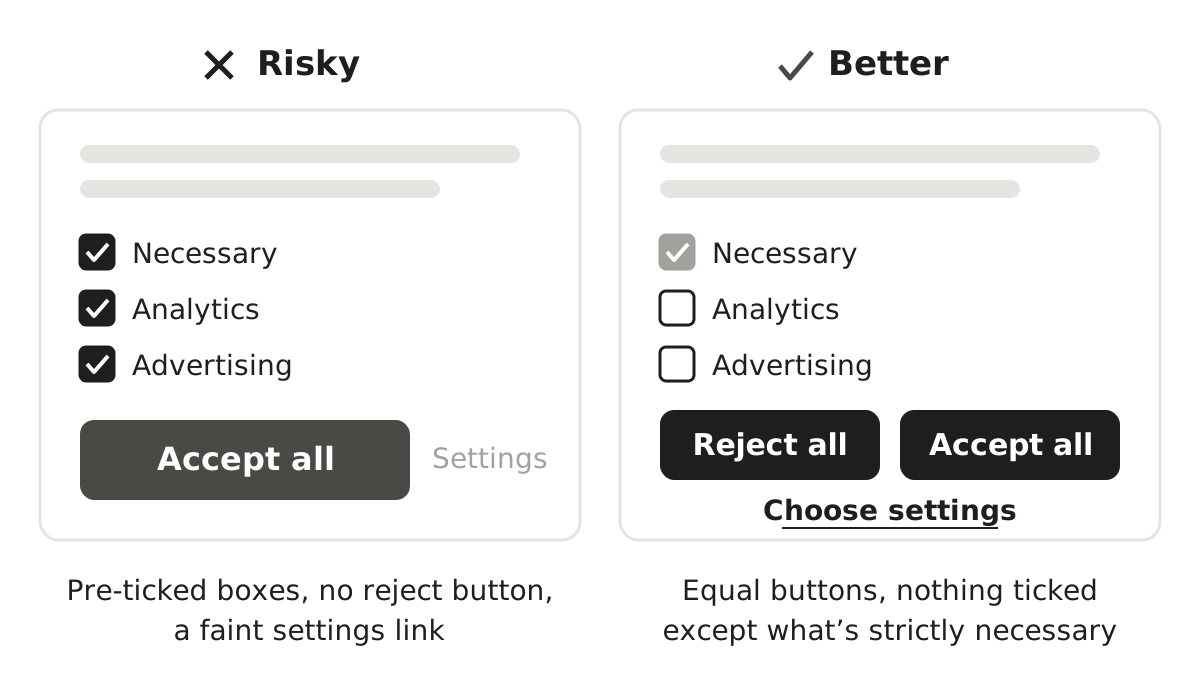
- Consent takes a clear action. Scrolling or carrying on browsing doesn’t count, and pre-ticked boxes aren’t consent.
- Rejecting is as easy as accepting. European regulators expect a “Reject all” option on the first screen, with similar prominence to “Accept all.”
- Choices are granular. Someone should be able to accept analytics and refuse advertising.
- People know who’s tracking them. Name the categories and main third parties, and say how long cookies last.
- Changing your mind is easy. A footer link or small floating button that reopens the settings does the job.
- You can prove it. Keep a record of what each visitor agreed to and when.
Mistakes regulators keep finding
- Tags that fire on page load, before the banner is answered. This is the most common problem, and you can check for it in your browser’s developer tools.
- No reject button on the first screen, only “Accept” and a “Manage settings” link leading to twenty toggles.
- Design nudges, like a bright “Accept” button beside a pale grey link.
- Advertising purposes switched on by default under a “legitimate interest” tab.
- Cookie walls that block the site unless you accept. Regulators are generally skeptical of them, and “pay or consent” models are still being argued over.
- A banner that pops up on every page because the choice isn’t saved, which wears people down until they click accept.
Honestly, most of these come from installing a consent tool and never testing it. Spend twenty minutes in a private browser window with the network tab open and you’ll know where you stand.
The US: opt-outs, privacy signals and pixel lawsuits
US law mostly doesn’t require consent before cookies load. Instead, state privacy laws treat tracking for targeted advertising as a sale or sharing of personal data (or simply as targeted advertising, depending on the state) and give people the right to opt out. Covered businesses usually need a “Do Not Sell or Share My Personal Information” link or similar, and California, Colorado and a growing list of other states require you to treat browser signals like Global Privacy Control as a valid opt-out.
There’s litigation risk as well. Over the past few years plaintiffs’ firms have filed a wave of lawsuits, many in California under older wiretapping and privacy laws, arguing that tracking pixels, session replay tools and chat widgets let third parties listen in on visitors without consent. Results have been mixed, but the suits keep coming. That’s one reason many US businesses now show a banner even where no statute strictly requires one.
Some sectors carry extra risk. Pixels on health-related pages have drawn attention from federal regulators, and tracking what people watch can raise issues under the federal Video Privacy Protection Act.
Canada, Australia and the UAE
Canada’s federal privacy law requires meaningful consent, which can sometimes be implied for less sensitive uses. Quebec is stricter: its privacy law requires technologies that identify, locate or profile people to be switched off by default. Australia has no specific cookie rule, but the Privacy Act applies when tracking involves personal information, and the law is being reformed. In the UAE, the federal data protection law is built largely around consent, the DIFC and ADGM free zones have their own regimes, and many businesses targeting UAE users simply use a European-style banner.
Setting up a banner that holds up
- Scan your site to list every cookie, pixel and script, including the ones plugins added quietly.
- Sort them into necessary, functional, analytics and advertising.
- Choose a consent management tool and configure it to actually block each category until consent. A notice on its own isn’t enough.
- Show the right banner by region: opt-in for EU and UK visitors, opt-out links and signal handling for the US states that require them.
- Test in a private window. Reject everything, then check that nothing non-essential loaded.
- Update your cookie policy so it matches what the site actually does.
- Set a sensible renewal period for consent, and remember refusals for months rather than asking again on every visit.
Next steps
- Run the private-window test on your own site this week.
- Ask your web agency or developer which tags were added in the last year and who approved them.
- Check that your analytics and advertising vendors have a data processing agreement or equivalent terms in place.
- If an agency runs your site, make sure the contract says who’s responsible for cookie compliance, and read the indemnity and limitation of liability terms before a regulator comes knocking.
You can check agency and vendor contracts for missing data protection terms with LegalWolf.
This article is general information, not legal or tax advice. Laws differ between countries and states and change over time, so check the rules that apply to you or speak to a qualified professional.